Sunday, 31 May 2020

ASP .NET WEB API Example

ASP .NET WEB API Example


ASP.NET Web API is a framework for building HTTP services that can be accessed from any client including browsers and mobile devices. 
It is an ideal platform for building Restful applications on the .NET Framework.

Let’s take a look at a simple example of Web API by creating a new ASP.NET Web Application.

Today will create two API for employee with fixed data as below.

    1- Get All Employee Details
    2- Get Employee Details

Step 1 − Open the Visual Studio and click File → New → Project menu option with Name "Demo.Web.API".

Create Project Architecture

 Application Business Models Business Layer Data Access Layer Utility
 Demo.Web.API Demo.BussinessObject Demo.BusinessLayer Demo.DataAccessLayer Demo.Utility

e.g. see in below image


1. Create New Model for employee

namespace Demo.BussinessObject
{
    public class Employee
    {
        public int EmployeeId { get; set; }
 
        public string EmployeeCode { get; set; }
 
        public string EmployeeName { get; set; }
 
        public string City { get; set; }
 
        public string ContactNo { get; set; }
    }
}

2.  Create data for employee.

using Demo.BussinessObject;
using System;
using System.Collections.Generic;
using System.Linq;
 
namespace Demo.DataAccessLayer
{
    public class EmployeeFactory : IDisposable
    {
        public void Dispose()
        {
        }
 
        /// <summary>
        /// This method is used for get all employee
        /// </summary>
        /// <returns></returns>
        public List<Employee> GetEmployees()
        {
            try
            {
                List<Employee> employees = new List<Employee>();
 
                employees.Add(new Employee() { EmployeeId = 1, EmployeeCode = "EMP001",
 EmployeeName = "Ramesh Kumar", ContactNo = "9876543210", City = "Delhi" });
                employees.Add(new Employee() { EmployeeId = 2, EmployeeCode = "EMP002", 
EmployeeName = "Mohan Kumar", ContactNo = "9876543211", City = "Haryana" });
                employees.Add(new Employee() { EmployeeId = 3, EmployeeCode = "EMP003", 
EmployeeName = "Sohan Kumar", ContactNo = "9876543212", City = "Mumbai" });
                employees.Add(new Employee() { EmployeeId = 4, EmployeeCode = "EMP004", 
EmployeeName = "Vijay Kumar", ContactNo = "9876543213", City = "Bhopal" });
 
                return employees;
            }
            catch (Exception ex)
            {
                throw ex;
            }
        }
 
        /// <summary>
        /// This method is used for get employee by id
        /// </summary>
        /// <param name="empId"></param>
        /// <returns></returns>
        public Employee GetEmployee(int empId)
        {
            try
            {
                var employees = GetEmployees();
                Employee employee = employees.FirstOrDefault(x => x.EmployeeId == empId);
                return employee;
            }
            catch (Exception ex)
            {
                throw ex;
            }
        }
    }
}

3. Create Business Layer method for employee to call data factory method.


using Demo.BussinessObject;
using Demo.DataAccessLayer;
using System;
using System.Collections.Generic;
 
namespace Demo.BussinessLayer
{
    public class Employees : IDisposable
    {
        public void Dispose()
        {
        }
 
        /// <summary>
        /// This method is used for get all employees
        /// </summary>
        /// <returns></returns>
        public List<Employee> GetEmployees()
        {
            try
            {
                using (EmployeeFactory factory = new EmployeeFactory())
                {
                    return factory.GetEmployees();
                }
            }
            catch (Exception ex)
            {
                throw ex;
            }
        }
 
        /// <summary>
        /// This method is used for get employee by id
        /// </summary>
        /// <param name="empId"></param>
        /// <returns></returns>
        public Employee GetEmployee(int empId)
        {
            try
            {
                using (EmployeeFactory factory = new EmployeeFactory())
                {
                    return factory.GetEmployee(empId);
                }
            }
            catch (Exception ex)
            {
                throw ex;
            }
        }
    }
}


4. Create API controller to create API & call business layer method

using Demo.BussinessLayer;
using Demo.BussinessObject;
using Demo.Web.API.Models;
using System;
using System.Collections.Generic;
using System.Net;
using System.Net.Http;
using System.Web.Http;
 
namespace Demo.Web.API.Controllers
{
    public class EmployeeController : ApiController
    {
        [HttpGet]
        public HttpResponseMessage GetEmployees()
        {
            try
            {
                ApiResponce<List<Employee>> apiResponce = new ApiResponce<List<Employee>>();
                using (Employees employees = new Employees())
                {
                    apiResponce.Responce = employees.GetEmployees();
                    apiResponce.Message = "Record Found";
                    apiResponce.Status = "Success";
                }
                return Request.CreateResponse(HttpStatusCode.OK, apiResponce);
            }
            catch (Exception ex)
            {
                return Request.CreateResponse(HttpStatusCode.BadRequest, ex.InnerException);
            }
        }
 
        [HttpGet]
        public HttpResponseMessage GetEmployee(int id)
        {
            try
            {
                ApiResponce<Employee> apiResponce = new ApiResponce<Employee>();
                using (Employees employees = new Employees())
                {
                    apiResponce.Responce = employees.GetEmployee(id);
                    apiResponce.Message = "Record Found";
                    apiResponce.Status = "Success";
                }
                return Request.CreateResponse(HttpStatusCode.OK, apiResponce);
            }
            catch (Exception ex)
            {
                return Request.CreateResponse(HttpStatusCode.BadRequest, ex.InnerException);
            }
        }
    }
}

5. Run this application for test APIs.
1.https://localhost:44373/api/Employee/GetEmployees
Response
{"Responce":[{"EmployeeId":1,"EmployeeCode":"EMP001","EmployeeName":"Ramesh Kumar","City":"Delhi","ContactNo":"9876543210"},{"EmployeeId":2,"EmployeeCode":"EMP002","EmployeeName":"Mohan Kumar","City":"Haryana","ContactNo":"9876543211"},{"EmployeeId":3,"EmployeeCode":"EMP003","EmployeeName":"Sohan Kumar","City":"Mumbai","ContactNo":"9876543212"},{"EmployeeId":4,"EmployeeCode":"EMP004","EmployeeName":"Vijay Kumar","City":"Bhopal","ContactNo":"9876543213"}],"Status":"Success","Message":"Record Found"}


2. https://localhost:44373/api/Employee/GetEmployee?id=1
Response
{"Responce":{"EmployeeId":1,"EmployeeCode":"EMP001","EmployeeName":"Ramesh Kumar","City":"Delhi","ContactNo":"9876543210"},"Status":"Success","Message":"Record Found"} 
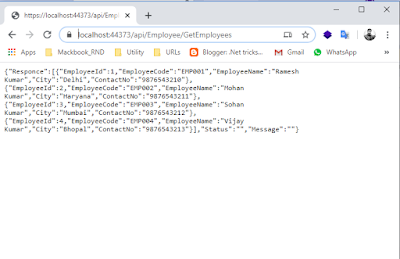
Responce of API


Response of API


Sunday, 29 March 2020

How To Create JavaScript Function

How To Create JavaScript Function 


Use Keyword "function" to create function with parameter or parameter less.

see the example as below.

e.g.:- 1 - Parameter Less Function

function sum(){
let a =5;
let b=10;
let c=a+b;
console.log(c);
}


e.g.:- 2 - Parameter Function

function sum(a,b){
let c=a+b;
console.log(c);
}

e.g :- 3 - Function As Expression

var sum = function(a,b){
let c= a+b;
return c;
}

let  output =sum(5,10);
console.log(output );

e.g :- 4 - Arrow Function

let sum = (a,b) => a+b;
let  output =sum(5,10);
console.log(output);

Tuesday, 3 March 2020

Logging using log4net

Logging using log4net


Step : 1 

Create Demo application like console application.

Step : 2

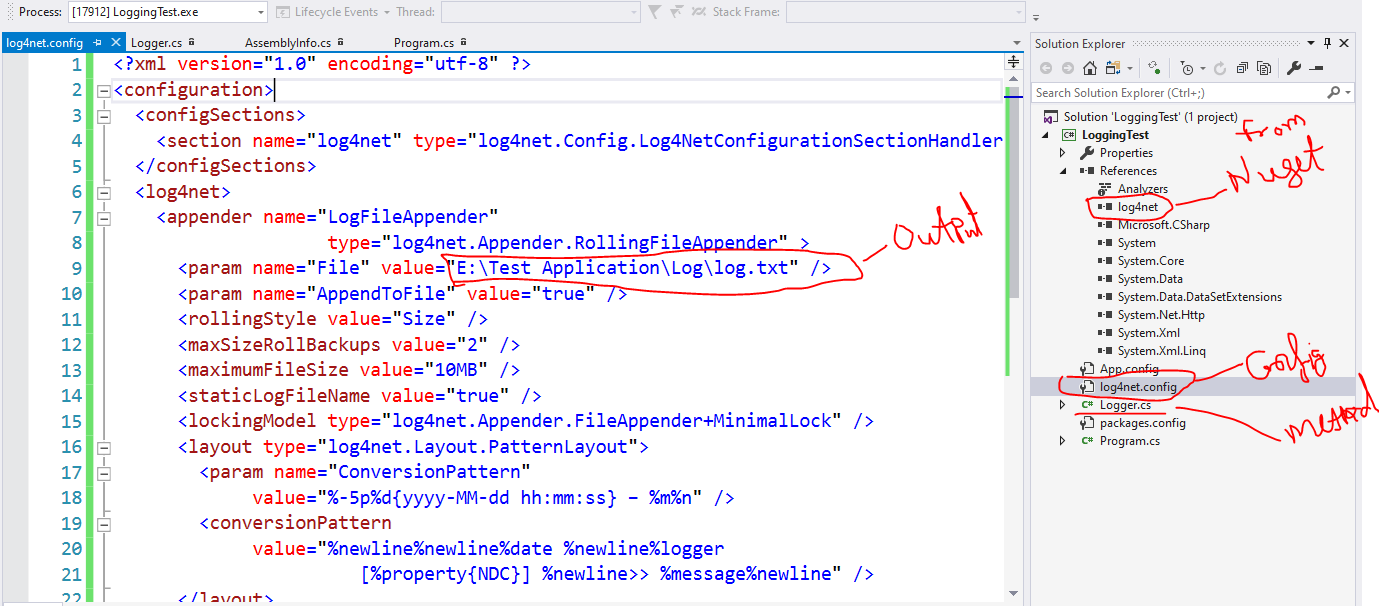
Add log4Net library from nuget manager.

Step : 3

Add config file for log4net


<?xml version="1.0" encoding="utf-8" ?>
<configuration>
  <configSections>
    <section name="log4net" type="log4net.Config.Log4NetConfigurationSectionHandler,log4net" />
  </configSections>
  <log4net>
    <appender name="LogFileAppender"
                    type="log4net.Appender.RollingFileAppender" >
      <param name="File" value="E:\Test Application\Log\log.txt" />
      <param name="AppendToFile" value="true" />
      <rollingStyle value="Size" />
      <maxSizeRollBackups value="2" />
      <maximumFileSize value="10MB" />
      <staticLogFileName value="true" />
      <lockingModel type="log4net.Appender.FileAppender+MinimalLock" />
      <layout type="log4net.Layout.PatternLayout">
        <param name="ConversionPattern"
             value="%-5p%d{yyyy-MM-dd hh:mm:ss} – %m%n" />
        <conversionPattern
             value="%newline%newline%date %newline%logger 
                       [%property{NDC}] %newline>> %message%newline" />
      </layout>
    </appender>
    <root>
      <level value="ALL" />
      <appender-ref ref="LogFileAppender" />
    </root>
  </log4net>
</configuration>  


Step : 5

Add one class for logging method

using System;
using System.Collections.Generic;
using System.Linq;
using System.Text;
using System.Threading.Tasks;

namespace LoggingTest
{
    public static class Logger
    {
        private static log4net.ILog Log { get; set; }

        static Logger()
        {
            Log = log4net.LogManager.GetLogger(typeof(Logger));
        }

        public static void Error(object msg)
        {
            Log.Error(msg);
        }

        public static void Error(object msg, Exception ex)
        {
            Log.Error(msg, ex);
        }

        public static void Error(Exception ex)
        {
            Log.Error(ex.Message, ex);
        }

        public static void Info(object msg)
        {
            Log.Info(msg);
        }
    }
}


Step : 6

Register config file into application assembly (Properties >> AssemblyInfo.cs).


[assembly: log4net.Config.XmlConfigurator(ConfigFile = "log4net.config", Watch = true)]


Step : 7

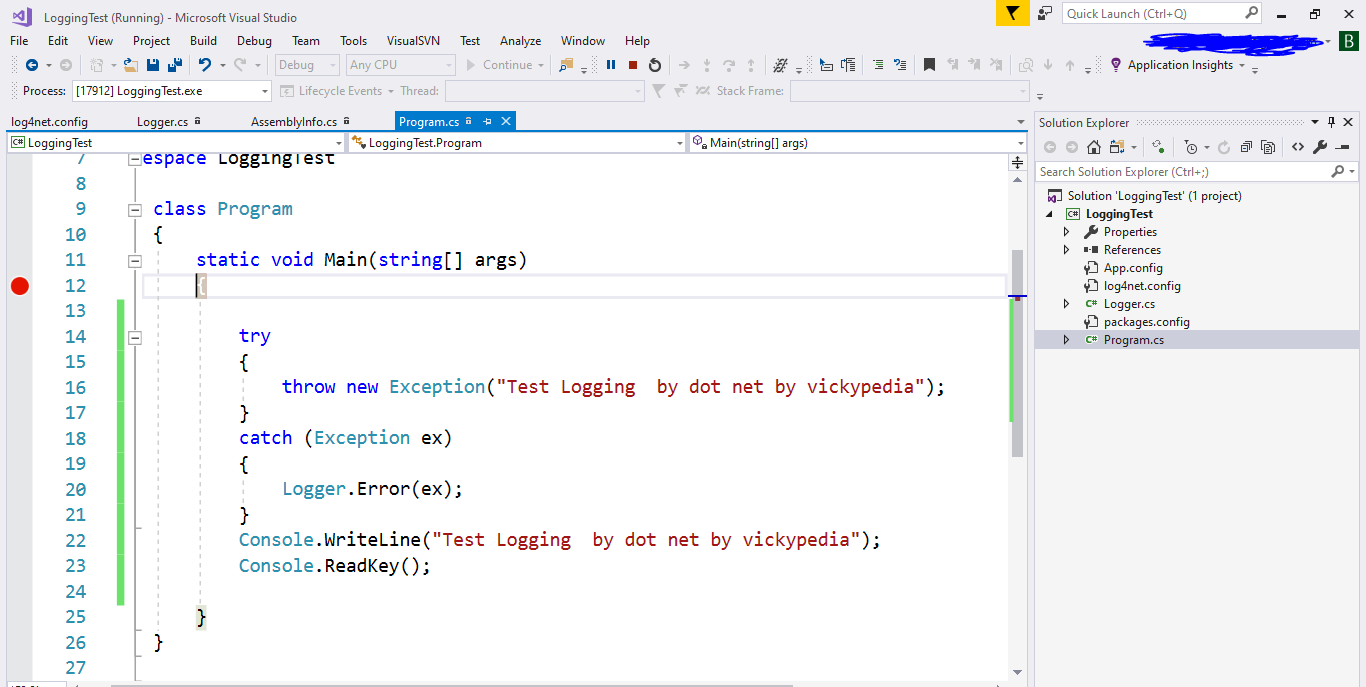
Use logger method as like uses.

class Program
    {
        static void Main(string[] args)
        {
           
            try
            {
                throw new Exception("Test Logging  by dot net by vickypedia");
            }
            catch (Exception ex)
            {
                Logger.Error(ex);
            }
            Console.WriteLine("Test Logging  by dot net by vickypedia");
            Console.ReadKey();

        }
    }


Step :8 

See the log file as mention into config "E:\Test Application\Log\log.txt"


Sunday, 19 January 2020

Create Custom Primary Key SQL

Create Custom Primary Key SQL


Step 1: Create a function to get custom value

e.g. : EMP-0001, EMP-0002

CREATE FUNCTION Empcode (@id INT)
returns CHAR(10)
AS
  BEGIN
      RETURN 'EMP-'+ RIGHT('0000' + CONVERT(VARCHAR(10), @id), 4)
  END 

Step 2: Create table "tbl_Emloyee"

Note :-Add EmploeeId column , datatype as function name and parameter will be id

CREATE TABLE tbl_Employee
(
Id int primary key identity(1,1),
EmployeeId as dbo.Empcode(Id),
EmployeeName VARCHAR(50) NOT NULL,
EmployeeDOB DateTime ,
Gender int,
Address VARCHAR(500),
State int,
Hobbies VARCHAR(200)
)


Step 3:- Insert Values 

INSERT INTO [dbo].[tbl_Employee]
            ([EmployeeName],
             [EmployeeDOB],
             [Gender],
             [Address],
             [State],
             [Hobbies])
VALUES      ('Test User',
             Getdate(),
             1,
             'Address delhi',
             1,
             'Writing Blog') 


Step 4 :- To Check

SELECT * FROM tbl_Employee;


See Custom value as primary key

Saturday, 21 December 2019

Web API Basic Authentication Using MVC

Web API Basic Authentication Using MVC


Step :1 Create WEB  API Application

Step :2 Create Authorization Filter

using System;
using System.Collections.Generic;
using System.Linq;
using System.Net;
using System.Net.Http;
using System.Security.Principal;
using System.Text;
using System.Threading;
using System.Web;
using System.Web.Http.Controllers;
using System.Web.Http.Filters;
using Test.BussinessLayer;

namespace Test.Web.API
{
    public class BasicAuthenticationAttribute : AuthorizationFilterAttribute
    {
        private const string keyName = "TestName";
        public override void OnAuthorization(HttpActionContext actionContext)
        {
            if (actionContext.Request.Headers.Authorization == null)
            {
                actionContext.Response = actionContext.Request.CreateResponse(HttpStatusCode.Unauthorized);
                if (actionContext.Response.StatusCode == HttpStatusCode.Unauthorized)
                {
                    actionContext.Response.Headers.Add("WWW-Authenticate", string.Format("Basic auth=\"{0}\"", keyName));
                }
            }
            else
            {
                string authenticationToken = actionContext.Request.Headers.Authorization.Parameter;
                string decodedAuthenticationToken = Encoding.UTF8.GetString(Convert.FromBase64String(authenticationToken));
                string[] usernamePasswordArray = decodedAuthenticationToken.Split(':');
                string username = usernamePasswordArray[0];
                string password = usernamePasswordArray[1];
                if (UserValidate.Login(username, password))
                {
                    var identity = new GenericIdentity(username);
                    IPrincipal principal = new GenericPrincipal(identity, null);
                    Thread.CurrentPrincipal = principal;
                    if (HttpContext.Current != null) { HttpContext.Current.User = principal; }
                }
                else
                {
                    actionContext.Response = actionContext.Request.CreateResponse(HttpStatusCode.Unauthorized);
                }
            }
        }
    }

}


Step :3 Create Method For Validate User

using System;
using System.Collections.Generic;
using System.Linq;
using System.Text;
using System.Threading.Tasks;
using Test.DataAccessLayer;

namespace Test.BussinessLayer
{
    public class UserValidate
    {
        //This method is used to check the user credentials
        public static bool Login(string username, string password)
        {
            return new UserFactory().UserValidate(username, password);
        }
    } 
}


Step :4 Create Method to check user exist into database

return TRUE when yes other wise FALSE.

Step :5 User the filter attribute

Use the "[BasicAuthentication]" filter attribute above controller action method. 


Tuesday, 5 February 2019

Factory Design Pattern in C#

Factory Design Pattern

In Factory pattern, we create the object without exposing the creation logic. In this pattern, an interface is used for creating an object, but let subclass decide which class to instantiate. The creation of object is done when it is required. The Factory method allows a class later instantiation to sub classes.

In short, factory method design pattern abstract the process of object creation and allows the object to be created at run-time when it is required.

Example :- Employee

A) Class Library :- Test.Employee


1) EmployeeFactory

using System;
using System.Configuration;

namespace Test.Employee
{
    public class EmployeeFactory
    {
        private static Type _empType;

        private static string GetTypeName(string factoryName)
        {
            var nameSpace = ConfigurationManager.AppSettings["EmployeeFactory"];
            return String.Format("{0}.{1}, {0}", nameSpace, factoryName);
        }

        public static IEmployeeManager GetManager()
        {
            if (_empType == null)
            {
                var empTypeName = GetTypeName("EmployeeManager");
                if (!string.IsNullOrEmpty(empTypeName))
                    _empType = Type.GetType(empTypeName);
                else
                    throw new NullReferenceException("EmployeeManagerType");
                if (_empType == null)
                    throw new ArgumentException(string.Format("Type {0} could not be found", empTypeName));
            }
            return (IEmployeeManager)Activator.CreateInstance(_empType);
        }
    }
}

2) IEmployee (Interface)

namespace Test.Employee
{
    public interface IEmployee
    {
        string Name { get; set; }

        int GetSalary();
    }
}

3) IEmployeeManager (Interface)

using System;

namespace Test.Employee
{
    public interface IEmployeeManager : IDisposable
    {
        string Data { get; set; }

        T GetProvider<T>() where T : class;
    }
}

B) Class Library :- Test.Employee.Parmanent

1) Employee (Class)

namespace Test.Employee.Parmanent
{
    public class Employee : IEmployee
    {
        public string Name { get; set; } = "Permanent";
        public int InHandSalary { get; set; }
        public int PF { get; set; }

        public int GetSalary()
        {
            return InHandSalary + PF;
        }
    }
}

2) EmployeeManager 

using System;

namespace Test.Employee.Parmanent
{
    public class EmployeeManager : IEmployeeManager
    {
        private static string _typeMask = typeof(EmployeeManager).FullName.Replace("EmployeeManager", @"{0}");

        private object _NewInstance = null;

        public string Data { get; set; }

        public T GetProvider<T>() where T : class
        {
            var typeName = string.Format(_typeMask, typeof(T).Name.Substring(1));
            var type = Type.GetType(typeName);
            if (type != null)
            {
                _NewInstance = Activator.CreateInstance(type);
                return _NewInstance as T;
            }
            else
                throw new NotImplementedException(typeName);
        }

        public void Dispose()
        {
            if (_NewInstance is IDisposable)
            {
                ((IDisposable)_NewInstance).Dispose();
            }
            _NewInstance = null;
        }
    }
}

C) Class Library :- Test.Employee.Temporary

1) Employee  (Class)

namespace Test.Employee.Temporary
{
    public class Employee : IEmployee
    {
        public string Name { get; set; } = "Temporary";

        public int InHandSalary { get; set; }

        public int PF { get; set; }

        public int GetSalary()
        {
            return InHandSalary + PF;
        }
    }
}

2)EmployeeManager  (Class) 

using System;

namespace Test.Employee.Temporary
{
    public class EmployeeManager : IEmployeeManager
    {
        private static string _typeMask = typeof(EmployeeManager).FullName.Replace("EmployeeManager", @"{0}");

        private object _NewInstance = null;

        public string Data { get; set; }

        public T GetProvider<T>() where T : class
        {
            var typeName = string.Format(_typeMask, typeof(T).Name.Substring(1));
            var type = Type.GetType(typeName);
            if (type != null)
            {
                _NewInstance = Activator.CreateInstance(type);
                return _NewInstance as T;
            }
            else
                throw new NotImplementedException(typeName);
        }

        public void Dispose()
        {
            if (_NewInstance is IDisposable)
            {
                ((IDisposable)_NewInstance).Dispose();
            }
            _NewInstance = null;
        }
    }
}

4) Console Application :- TestFactoryPattern

1) Program (Class)

using System;
using Test.Employee;

namespace TestFactoryPattern
{
    internal class Program
    {
        private static void Main(string[] args)
        {
            try
            {
                using (var empManager = EmployeeFactory.GetManager())
                {
                    var employee = empManager.GetProvider<IEmployee>();
                    Console.WriteLine(employee.Name);
                    Console.ReadLine();
                }
            }
            catch (Exception ex)
            {
                Console.WriteLine(ex.Message);
                Console.ReadLine();
            }
        }
    }
}

2) App.Config

<?xml version="1.0" encoding="utf-8" ?>
<configuration>
  <startup>
    <supportedRuntime version="v4.0" sku=".NETFramework,Version=v4.5.2" />
  </startup>
  <appSettings>
    <add key="EmployeeFactory" value="Test.Employee.Parmanent" />
    <!--<add key="EmployeeFactory" value="Test.Employee.Temporary" />-->
  </appSettings>
</configuration>

Note :- 
        a) Pass the reference Test.Employee To All Project 
        b) Test.Employee.Permanent & Test.Employee.Temporary in Console App
        c) Configure any one at Run time by using config file

Result :- if you set "Test.Employee.Parmanent" in config then result will shown of Permanent 


Factorial of a Number

Recently Viewed