Wednesday, 5 April 2017

Print Number 12345

Print Number 12345 

#1 :-USING The Console Application in Visual Studio.

#2:- Add-This Class
------------------------------------------------------------------------------------------------------------------
using System;
using System.Collections.Generic;
using System.Linq;
using System.Text;

namespace PrintNumber12345
{
    /// <summary>
    /// This is Used for print number like in below
    /// 1
    /// 12
    /// 123
    /// 1234
    /// 12345
    /// 1234
    /// 123
    /// 12
    /// 1
    /// Powered By :- DOTNET BY VICKYPEDIA
    /// </summary>
    class Program
    {
        static void Main(string[] args)
        {
            Console.Write("Powered By :- DOTNET BY VICKYPEDIA");
            Console.Write("\n");
            int number = 5;
           
            //Loop For PRINT Like
            //This Loop Start with i=1 and end with 5
            //-1
            //-12
            //-123
            //-1234
            //-12345
            for (int i = 1; i <= number; ++i)
            {
                for (int x = 1; x <= i; ++x)
                {
                    Console.Write(x);
                }
                Console.Write("\n");
            }

            //Loop For PRINT Like
            //This Loop Start with i=4 and end with 1
            //-1234
            //-123
            //-12
            //-1
            for (int i = number - 1; i >= 1; --i)
            {
                for (int x = 1; x <= i; ++x)
                {
                    Console.Write(x);
                }
                Console.Write("\n");
            }

            Console.Write("\n Thanks You");
            Console.ReadLine();

        }
    }
}
-------------------------------------------------------------------------------------------------


Saturday, 25 February 2017

Creating Pyramid in C#

Creating Pyramid in C#


To using Console Application......


class :-- application.cs

------------------------------------------------

using System;
using System.Collections.Generic;
using System.Linq;
using System.Text;
using System.Threading.Tasks;

namespace ConsoleApplicationfirst
{
    class Program
    {
        static void Main(string[] args)
        {
            fnpyramid obj = new fnpyramid();
            obj.createPyramid();

            Console.WriteLine("\n");

            obj.createPyramidNumber();

            Console.WriteLine("\n");
            Console.WriteLine("Example made by DOTNET BY VICKYPEDIA");
            
            Console.Read();
        }
    }
}


class :-- fnPyramid.cs

------------------------------------------------

using System;
using System.Collections.Generic;
using System.Linq;
using System.Text;
using System.Threading.Tasks;

namespace ConsoleApplicationfirst
{
    class fnpyramid
    {
        /// <summary>
        /// Create function for print pyramid like....
        ///     1
        ///    121
        ///   12321
        ///  1234321
        /// 123454321
        /// </summary>
        public void createPyramid()
        {
            int numberoflayer = 6, Space, Number;
            Console.WriteLine("Print paramid as Number");
            for (int i = 1; i <= numberoflayer; i++)
            {
                for (Space = 1; Space <= (numberoflayer - i); Space++)
                    Console.Write(" ");
                for (Number = 1; Number <= i; Number++)
                    Console.Write('*');
                for (Number = (i - 1); Number >= 1; Number--)
                    Console.Write('*');
                Console.WriteLine();
            }
        }


        /// <summary>
        ///  Create function for print pyramid like....
        ///          *
        ///         ***
        ///        *****
        ///       *******
        ///      *********
        /// </summary>
        public void createPyramidNumber()
        {
            int numberoflayer = 6, Space, Number;
            Console.WriteLine("Print paramid as Star");
            // Total number of layer for pramid
            for (int i = 1; i <= numberoflayer; i++) 
            {
                // Loop For Space
                for (Space = 1; Space <= (numberoflayer - i); Space++)  
                    Console.Write(" ");
                //increase the value
                for (Number = 1; Number <= i; Number++)
                    Console.Write(Number);
                //decrease the value
                for (Number = (i - 1); Number >= 1; Number--) 
                    Console.Write(Number);
                Console.WriteLine();
            }
        }

    }
}


OUTPUT
--------------------------------


Wednesday, 1 February 2017

Hello World Program with MVC

Hello World Program with MVC


Step :-1 --- Select Web Project - ASP MVC Application
----------------------------------------------------------------------------------


Step:-2 -- Select Project Template and View Engine ( ASPX)
--------------------------------------------------------------------------------


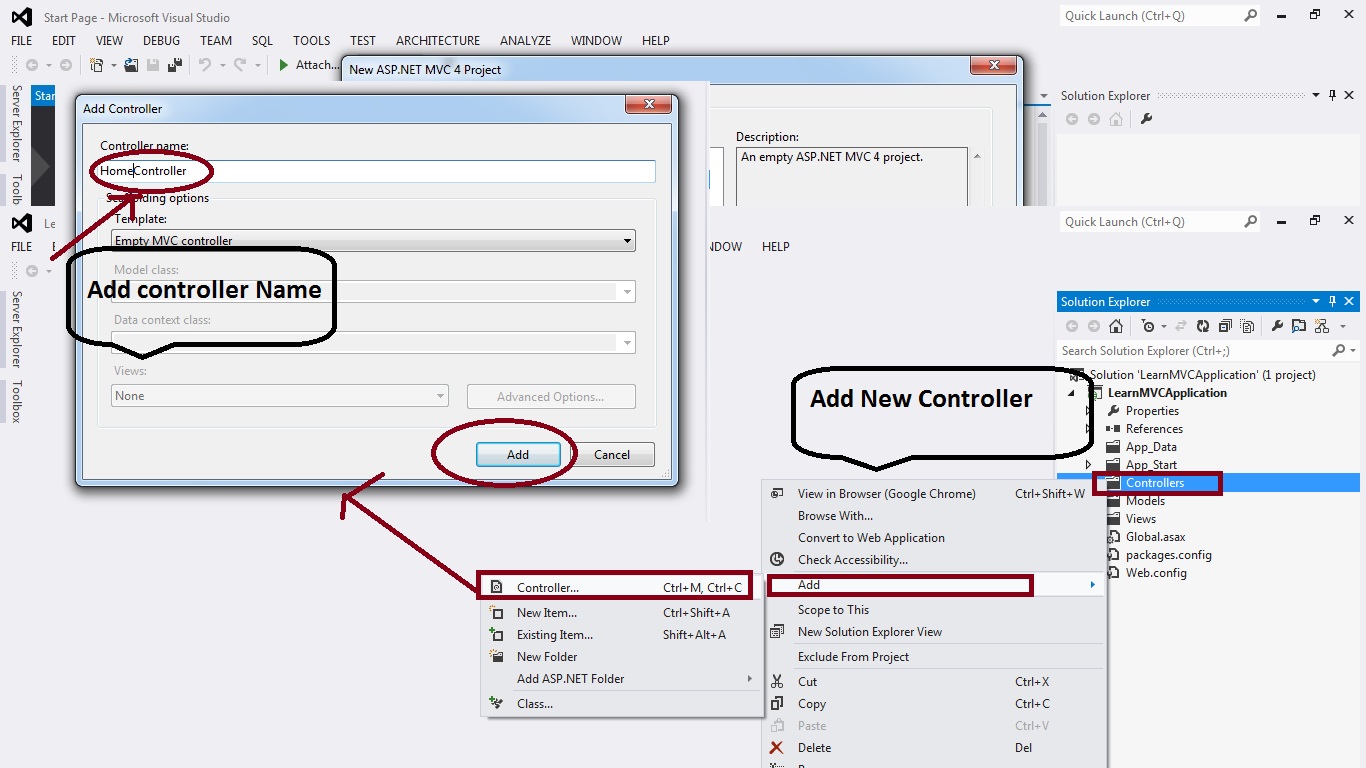
Step :3 -- Add Controller & Rename Controller
----------------------------------------------------------------


Step :4-- Add View and Unchecked the master layout
------------------------------------------------------------------------------


Step:5--- Add Content As per requirement / Design into view page
-------------------------------------------------------------------------------------


Step:6 -- Add Route action name as "....." View Page name
-------------------------------------------------------------------------------


Step:7 -- Change Controller function same name as view name
---------------------------------------------------------------------------------


Step:8 -- Run the Application & Enjoy MVC Application
------------------------------------------------------------------------------


Enjoy With Example.... Show the Images Step By Step.......

Tuesday, 25 October 2016

HOW TO VALIDATE INPUT FIELD NUMERIC WITH FIXED NUMBER.

HOW TO VALIDATE INPUT FIELD NUMERIC WITH FIXED NUMBER OF DIGIT


Validation for Number(CONTACT NUMBER (10 Digit max )).

--------------------------------------------------------------------------------------------------------------------------
<script language="javascript" type="text/javascript">

    function fixedlength(textboxID, keyEvent, maxlength) {
        //validation for digits upto 'maxlength' defined by caller function
        if (textboxID.value.length > maxlength) {
            textboxID.value = textboxID.value.substr(0, maxlength);
        }
        else if (textboxID.value.length < maxlength || textboxID.value.length == maxlength) {
            textboxID.value = textboxID.value.replace(/[^\d]+/g, '');
            return true;
        }
        else
            return false;
    }

    function CheckMax(controlname) {
        var num = document.getElementById('<%=txtAmount.ClientID %>').value;
        if (num > 100 || num <= 0) {
            alert('Please Enter Value between 1 to 100');
            document.getElementById('<%=txtAmount.ClientID %>').value = '';
               document.getElementById('<%=txtAmount.ClientID %>').focus();
            return false;
        }
     return true;
 }
</script>
--------------------------------------------------------------------------------------------------------------------------
--------------------------------------------------------------------------------------------------------------------------

<form id="form1" runat="server" action="ValidateFormWebUI.aspx" autocomplete="off">
        
            
            <div class="submain">
                <table class="tblform">
                    <tbody>
                          <tr>
                            <td class="textfield" title="Enter Name">Name</td>
                            <td class="textfield">
                                <input id="txtName" name="NAME" class="InputField" maxlength="150" type="text" value="" /></td>
                        </tr>
                        <tr>
                            <td class="textfield" title="Enter Name">Contact</td>
                            <td class="textfield"><asp:textbox class="InputField" id="txtContactNo" runat="server" maxlength="10" onblur="return fixedlength(this, event, 10);" onkeypress="return fixedlength(this, event, 10);" onkeyup="return fixedlength(this, event, 10);"></asp:textbox></td>
                        </tr>
                         <tr>
                            <td class="textfield" title="Enter Name">Amount (0-100)</td>
                            <td class="textfield"><asp:textbox class="InputField" id="txtAmount" runat="server" maxlength="3"></asp:textbox></td>
                        </tr>
                    </tbody>
                </table>
            </div>
       
    </form>

Monday, 5 September 2016

SQL JOINS with Examples

SQL JOINS with Examples


SQL JOIN :- The SQL Joins clause is used to combine records from two or more tables in a database. A JOIN is a means for combining fields from two tables by using values common to each.

INNER JOIN:- An SQL INNER JOIN returns all rows from multiple tables where the join condition is met.

NOTE :- IN Example Using Table find in below link page.


Example:- 

SELECT Emp1.ID,Emp1.Name,User1.ID,User1.City
FROM Emp1
INNER JOIN User1
ON Emp1.ID=User1.ID;


LEFT JOIN :- The SQL LEFT JOIN returns all rows from the left table, even if there are no matches in the right table.

EXAMPLE :- 

SELECT Emp1.ID,Emp1.Name,Emp1.Company,User1.ID,User1.Name,User1.City
FROM Emp1
LEFT JOIN User1
ON Emp1.ID=User1.ID;


RIGHT JOIN:- The SQL RIGHT JOIN returns all rows from the right table, even if there are no matches in the left table. 

EXAMPLE :- 

SELECT Emp1.ID,Emp1.Name,Emp1.Company,User1.ID,User1.Name,User1.City
FROM Emp1
RIGHT JOIN User1
ON Emp1.ID=User1.ID;


Create , Insert , and Select Query in SQL

Create , Insert , and Select Query in SQL

Create :- The CREATE TABLE statement is used to create a table in a database.

SYNTAX :- 
                CREATE TABLE table_name(
                                      column1 datatype,
                                      column2 datatype,
                                      column3 datatype,
                                      .....
                                      columnN datatype,
                                      PRIMARY KEY( one or more columns )
                                     );
EXAMPLE :-

CREATE TABLE Emp1(
ID int not null,
Name varchar(50),
Company varchar(50),
Salary varchar(50),
);

CREATE TABLE User1(
ID int not null,
Name varchar(50),
City varchar(50),
);


 INSERT :- The SQL INSERT INTO Statement is used to add new rows of data to a table in the database.

SYNTAX :- INSERT INTO TABLE_NAME
                                       (column1, column2, column3,...columnN)
                             VALUES
                                     (value1, value2, value3,...valueN);
EXAMPLE :-
      
INSERT INTO Emp1 VALUES (1,'RAM','TCS','30000'),
(2,'SHYAM','TCS','78500'),
(3,'MOHAN','HP','58000'),
(4,'GEETA','HP','85000'),
(5,'SITA','WIPRO','44000'),
(6,'LAKSHMAN','WIPRO','5500'),
(7,'RAHIM','DELL','43000'),
(8,'AKASH','DELL','34000'),
(9,'RANI','HCL','54000'),
(10,'SOHAN','HCL','45000');

INSERT INTO User1 VALUES (1,'RAM','Nagpur'),
(2,'SHYAM','Pune'),
(3,'MOHAN','Dehradun'),
(4,'GEETA','Himachal'),
(5,'SITA','Nainital'),
(6,'LAKSHMAN','Punjab'),
(7,'RAHIM','Hariyana'),
(8,'AKASH','Noida'),
(9,'RANI','Delhi'),

(10,'SOHAN','Mumbai');


SELECT :- SQL SELECT statement is used to fetch the data from a database table which returns data in the form of result table. These result tables are called result-sets.

SYNTAX :- SELECT column1, column2, columnN FROM table_name;

EXAMPLE:-

            SELECT * FROM Emp1;


            SELECT * FROM User1;


Factorial of a Number

Recently Viewed