Saturday, 27 May 2017

Insert Update Delete Using Gridview

Insert Update Delete Using Grid-view

Step:-1 ) Using SQL Server Create Table


Create Table UserTest(
id int primary key identity(1,1),
Name nvarchar(200),
EmailId nvarchar(200),
DOB varchar(50),
City nvarchar(200),
Company nvarchar(200),
Salary int,
);

Step :- 2) Using Visual Studio Web Application


TestWebForm.aspx
-----------------------------------

<%@ Page Language="C#" AutoEventWireup="true" CodeBehind="TestWebForm.aspx.cs" Inherits="TestWebApp.TestWebForm" %>

<!DOCTYPE html>

<html xmlns="http://www.w3.org/1999/xhtml">
<head runat="server">
    <title></title>
    <script>
        function validateForm() {
            var txtName = document.getElementById('txtName');
            var txtEmailId = document.getElementById('txtEmailId');
            var txtDOB = document.getElementById('txtDOB');
            var txtCity = document.getElementById('txtCity');
            var txtCompany = document.getElementById('txtCompany');
            var txtSalary = document.getElementById('txtSalary');

            if (txtName.value == '') { alert('Enter Name'); txtName.focus(); return false; }
            if (txtEmailId.value == '') { alert('Enter Email-Id'); txtEmailId.focus(); return false; }
            if (txtDOB.value == '') { alert('Enter Date of Birth'); txtDOB.focus(); return false; }
            if (txtCity.value == '') { alert('Enter City Name'); txtCity.focus(); return false; }
            if (txtCompany.value == '') { alert('Enter Company Name'); txtCompany.focus(); return false; }
            if (txtSalary.value == '') { alert('Enter Sallary'); txtSalary.focus(); return false; }
        }
    </script>
</head>
<body>
    <form id="form1" runat="server">
        <div>
            <table>
                <tr>
                    <td>ID</td>
                    <td>
                        <input type="text" id="txtID"  readonly="true" class="inputTxt" runat="server" /></td>
                </tr>
                <tr>
                    <td>Name</td>
                    <td>
                        <input type="text" id="txtName" class="inputTxt" runat="server" /></td>
                </tr>
                <tr>
                    <td>EmailID</td>
                    <td>
                        <input type="text" id="txtEmailId" class="inputTxt" runat="server" /></td>
                </tr>
                <tr>
                    <td>Date of Birth</td>
                    <td>
                        <input type="text" id="txtDOB"  class="inputTxt" runat="server" /></td>
                </tr>
                <tr>
                    <td>City</td>
                    <td>
                        <input type="text" id="txtCity" class="inputTxt" runat="server" /></td>
                </tr>
                <tr>
                    <td>Company</td>
                    <td>
                        <input type="text" id="txtCompany" class="inputTxt" runat="server" /></td>
                </tr>
                <tr>
                    <td>Salary</td>
                    <td>
                        <input type="text" id="txtSalary" class="inputTxt" runat="server" /></td>
                </tr>
                <tr>
                    <td></td>
                    <td>
                        <asp:Button runat="server" ID="btnSave" CssClass="btn" Text="Save" OnClientClick="return validateForm()" OnClick="btnSave_Click" />
                        <asp:Button runat="server" ID="btnUpdate" CssClass="btn" Text="Update" Visible="false" OnClientClick="return validateForm()" OnClick="btnUpdate_Click" />
                        <asp:Button runat="server" ID="btnCancel" CssClass="btn" Text="Cancel" OnClick="btnCancel_Click" /></td>
                </tr>
            </table>

            <br />
            <br />
            <asp:GridView ID="grvTest" runat="server" DataKeyNames="id" OnRowDeleting="grvTest_RowDeleting" OnSelectedIndexChanged="grvTest_SelectedIndexChanged">
                <Columns>
                    <asp:CommandField HeaderText="Update" ShowSelectButton="true" />
                    <asp:CommandField HeaderText="Delete" ShowDeleteButton="true" />
                </Columns>
            </asp:GridView>
        </div>
    </form>
</body>
</html>


TestWebForm.aspx.cs
--------------------------------------------------------------------------------------
using System;
using System.Collections.Generic;
using System.Data;
using System.Data.SqlClient;
using System.Linq;
using System.Web;
using System.Web.UI;
using System.Web.UI.WebControls;

namespace TestWebApp
{
    public partial class TestWebForm : System.Web.UI.Page
    {
        SqlConnection con = new SqlConnection("Data Source=.;Initial Catalog=TestApp;Integrated Security=True");
        protected void Page_Load(object sender, EventArgs e)
        {
           
            if (!IsPostBack)
            {
                BindGridView();
            }

        }

        protected void btnSave_Click(object sender, EventArgs e)
        {
            try
            {
                con.Open();
                string str = "INSERT INTO UserTest(Name,EmailId,DOB,City,Company,Salary)";
                str += " VALUES('" + txtName.Value + "','" + txtEmailId.Value + "','" + Convert.ToDateTime(txtDOB.Value) + "','" + txtCity.Value + "','" + txtCompany.Value + "','" + txtSalary.Value + "');";
                SqlCommand cmd = new SqlCommand(str, con);
                int i = cmd.ExecuteNonQuery();
                con.Close();
                resetForm();
                BindGridView();
            }
            catch (Exception)
            {

                throw;
            }
            finally
            {
               
            }
        }

        protected void btnCancel_Click(object sender, EventArgs e)
        {
            resetForm();
            Response.Redirect("TestWebForm.aspx");
        }

        public void resetForm() {
            txtCity.Value = "";
            txtCompany.Value = "";
            txtDOB.Value = "";
            txtEmailId.Value = "";
            txtID.Value = "";
            txtName.Value = "";
            txtSalary.Value = "";
        }

        public void BindGridView()
        {
            try
            {
                DataSet ds = new DataSet();
                con.Open();
                string str = "SELECT * FROM UserTest;";
                SqlCommand cmd = new SqlCommand();
                SqlDataAdapter sda = new SqlDataAdapter(str, con);
                sda.Fill(ds);
                con.Close();
                grvTest.DataSource = ds;
                grvTest.DataBind();
            }
            catch (Exception)
            {

                throw;
            }
            finally
            {
               
            }
        }

        protected void grvTest_RowDeleting(object sender, GridViewDeleteEventArgs e)
        {
            try
            {
                con.Open();
                int id = Convert.ToInt32(grvTest.DataKeys[e.RowIndex].Value);
                string str = "DELETE FROM UserTest WHERE id='" + id + "'; ";
                SqlCommand cmd = new SqlCommand(str, con);
                int i = cmd.ExecuteNonQuery();
                con.Close();
                BindGridView();
            }
            catch (Exception)
            {

                throw;
            }
            finally
            {
                
            }
        }

        protected void grvTest_SelectedIndexChanged(object sender, EventArgs e)
        {
            GridViewRow newRow = grvTest.SelectedRow;
            txtID.Value = newRow.Cells[2].Text;
            txtName.Value = newRow.Cells[3].Text;
            txtEmailId.Value = newRow.Cells[4].Text;
            txtDOB.Value = newRow.Cells[5].Text;
            txtCity.Value = newRow.Cells[6].Text;
            txtCompany.Value = newRow.Cells[7].Text;
            txtSalary.Value = newRow.Cells[8].Text;
            btnSave.Visible = false;
            btnUpdate.Visible = true;
        }

        protected void btnUpdate_Click(object sender, EventArgs e)
        {
            try
            {
                con.Open();
                string str = "UPDATE UserTest SET Name='" + txtName.Value + "',EmailId='" + txtEmailId.Value + "',DOB='" + txtDOB.Value + "',City='" + txtCity.Value + "',Company='" + txtCompany.Value + "',Salary='" + txtSalary.Value + "' WHERE id='" + txtID.Value + "'; ";
                SqlCommand cmd = new SqlCommand(str, con);
                int i = cmd.ExecuteNonQuery();
                con.Close();
                BindGridView();
                resetForm();
            }
            catch (Exception)
            {

                throw;
            }
            finally
            {
                
            }
        }

    }
}


Sunday, 7 May 2017

Curd Operation - Stored Procedure

Curd Operation - Stored Procedure


Use IDE :- Microsoft SQL Server - 2008 R2


=================================================================
Create Database
=================================================================

CREATE DATABASE CurdDB;

USE CurdDB;


=================================================================
Create Table
=================================================================


CREATE TABLE [dbo].[Employee](
[EmpId] [bigint] IDENTITY(1,1) NOT NULL,
[FirstName] [varchar](50) NOT NULL,
[LastName] [varchar](50) NOT NULL,
[EmpNo] [varchar](50) NOT NULL,
[Department] [varchar](50) NOT NULL,
 CONSTRAINT [PK_Employee] PRIMARY KEY CLUSTERED 
(
[EmpId] ASC
)
) ON [PRIMARY]


=================================================================
Select Table
=================================================================

Select * from Employee;


=================================================================
Create Procedure for Get Employees Details
=================================================================


USE [CurdDB]
GO
SET ANSI_NULLS ON
GO
SET QUOTED_IDENTIFIER ON
GO
CREATE PROCEDURE [dbo].[GetEmployeeDetails]
AS
BEGIN
SELECT 
EmpId ,
FirstName ,
LastName ,
EmpNo ,
Department
FROM Employee
END


=================================================================
Create Procedure for INSERT AND UPDATE Record
=================================================================

USE [CurdDB]
GO
SET ANSI_NULLS ON
GO
SET QUOTED_IDENTIFIER ON
GO
CREATE PROCEDURE [dbo].[AddEmployee]
@EmpId BIGINT ,
@FirstName VARCHAR(50) ,
@LastName VARCHAR(150),
@EmpNo VARCHAR(50) ,
@Department VARCHAR(50)
AS

IF(@EmpId= 0)
BEGIN
INSERT INTO Employee
(
FirstName ,
LastName ,
EmpNo ,
Department
)
values
(
@FirstName ,
@LastName ,
@EmpNo ,
@Department
)
END
ELSE
BEGIN
UPDATE Employee
SET FirstName = @FirstName ,
LastName = @LastName ,
EmpNo = @EmpNo ,
Department = @Department
WHERE EmpId = @EmpId
END


=================================================================
Create Procedure for  Delete Record
=================================================================


USE [CurdDB]
GO
SET ANSI_NULLS ON
GO
SET QUOTED_IDENTIFIER ON
GO
CREATE PROCEDURE [dbo].[DeleteEmployee]
@EmpId BIGINT
AS
BEGIN
DELETE FROM Employee
WHERE EmpId = @EmpId
END


================================================================
Note :- Use these stored procedure for curd operation in application.
================================================================

Saturday, 22 April 2017

LogIn Page Design Using HTML,CSS & JavaScript.


Log In Template


Use Visual Studio To Run this Code.


Step ##-Follow the Below Code.

Page-1 :-LogIn.aspx
Page-2 :-LogIn.aspx.cs
Page-3 :-LogIn.CSS
Page-4 :-LogIn.Js

Note :- Connection String Defined in Web.Config
e.g:-
 <connectionStrings>
    <add name="dbconnection" connectionString="Data Source=VIJAY_CS-PC;Integrated Security=true;Initial Catalog=LogInDB" providerName="System.Data.SqlClient"/>
  </connectionStrings >
-------------------------------------------------------------------------------------------------------
Page-LogIn.aspx

-----------------------

<%@ Page Language="C#" AutoEventWireup="true" CodeBehind="login.aspx.cs" Inherits="LogInTest.test" %>

<!DOCTYPE html PUBLIC>
<html>
<head>
    <meta charset="utf-8">
    <title>DotNet By Vickypedia </title>
    <link href="LogInCSS.css" rel="stylesheet" />
    <script src="LogIn.js"></script>
    <script>
        function fnInvalidUser() {
            fnalertError("Please enter valid UserId and Password.");
            alert("Please enter valid UserId and Password.");
            return false;
        }

        function fnException(e) {
            fnalertError(e);
            alert(e);
            return false;
        }
    </script>
</head>
<body>
    <div class="container">
        <header style="border-bottom: 2px solid gray;">
            <div class="UIlogo">
                <div class="ui-logoImgDiv">
                    <a href="login.aspx">
                        <img alt="DotNet By Vickypedia" src="Images/logowithName.jpg" style="height: 60px;" data-sticky-top="15"
                            data-sticky-height="70" data-sticky-width="70">
                    </a>

                </div>
                <div class="LogInNames">
                    <asp:Label ID="lblExpMsg" runat="server" CssClass="uiError"></asp:Label>
                </div>
            </div>
        </header>
        <article style="background-color: rgba(173, 182, 187, 0.80); border-bottom: 2px solid gray;" class="login-sec">
            <table class="w-100 ">
                <tr style="height: 100px;">
                    <td>&nbsp</td>
                </tr>
                <tr>
                    <td align="right">
                        <div id="uilogInModal" class="ui-login">
                            <form id="Form1" name="form1" runat="server" class="" defaultfocus="txtPass" target="_self">
                              

                                <div id="contentDiv">
                                    <table class="w-100 hmslogInTbl">
                                        <tr><td colspan="2"> <div id="uiAlert" class="uiAlertClass"></div></td></tr>
                                        <tr>
                                            <td class="col-right">
                                                <label class="uilabel" title="Enter Your Username">User Name</label></td>
                                            <td>&nbsp&nbsp
                                                <asp:TextBox ID="txtMail" name="txtUsername" runat="server" placeholder="User Name" CssClass="uitextbox requred" MaxLength="45" autofocus=""></asp:TextBox>
                                            </td>
                                        </tr>
                                        <tr>
                                            <td class="col-right">
                                                <label class="uilabel" title="Enter Your Password">Password</label></td>
                                            <td>&nbsp&nbsp
                                                <asp:TextBox ID="txtPass" runat="server" name="txtPassword" TextMode="Password"  MaxLength="100" CssClass="uitextbox requred" placeholder="Password"></asp:TextBox>
                                            </td>
                                        </tr>
                                        <tr>
                                            <td>&nbsp&nbsp</td>
                                            <td>&nbsp&nbsp <input type="checkbox" id="chkRememberMe" />
                                            <label for="chkRememberMe" class="uilabelRM" title="remember userId and Password.">Remember Me</label></td>
                                        </tr>
                                        <tr>
                                            <td>&nbsp&nbsp </td>
                                             <td>
                                                <asp:Button ID="btnSave" runat="server" Text="Login" OnClick="btnSave_Click" OnClientClick="return logInValidation();" CssClass="uiButton"></asp:Button>
                                                <asp:LinkButton ID="lnkFrgtPass" CssClass="uiLinkButton" Text="Forgot Password" runat="server" OnClick="lnkFrgtPass_Click"></asp:LinkButton>
                                            </td>
                                        </tr>
                                    </table>
                                </div>
                            </form>
                        </div>
                    </td>
                </tr>
            </table>

        </article>
        <footer>
            <table class="w-100">
                <tr>
                    <td align="left"><a href="http://dotnetbyvickypedia.blogspot.in/" class="lnkBtn" target="new">Privacy Policy &nbsp;&nbsp;</a><span class="lnkBtn">|</span><a href="http://dotnetbyvickypedia.blogspot.in/"
                        target="new" class="lnkBtn">&nbsp;&nbsp;Terms of Use</a>
                    </td>
                    <td align="right" class="txtcopyright">Copyright &copy; DotNet By Vickypedia</td>
                </tr>
            </table>

        </footer>
    </div>
</body>
</html>

-----------------------------------------------------------------------------------------------

Page :- LogIn.aspx.cs
-----------------------------

using System;
using System.Collections.Generic;
using System.Linq;
using System.Web;
using System.Web.UI;
using System.Web.UI.WebControls;
using System.Data;
using MySql.Data.MySqlClient;
using System.Configuration;
using System.IO;
using System.Web.Security;

namespace LogIn
{
    public partial class test : System.Web.UI.Page
    {
        string conStr = ConfigurationManager.ConnectionStrings["ConnectionString"].ConnectionString;
        protected void Page_Load(object sender, EventArgs e)
        {
           
        }
        protected void btnSave_Click(object sender, EventArgs e)
        {

            string userId = Request.QueryString["userId"];
            MySqlConnection con = new MySqlConnection(conStr);
            con.Open();
            string qry = string.Empty;
            string UserType = "";
            string UserId = "";
            string UserName = "";
            string flag = "";
            qry = "select  USER_ID,concat(USER_SAL,'',USER_FIRSTNAME,'',USER_LASTNAME) as USER_NAME from user_info_mst where EMAIL_ID='" + txtMail.Text.Trim() + "' and USER_PASS='" + txtPass.Text.Trim() + "'";
             MySqlCommand cmd = new MySqlCommand(qry, con);
             MySqlDataReader mydr = cmd.ExecuteReader();
            while(mydr.Read())
            {
                UserId = mydr["USER_ID"].ToString();
                UserName = mydr["USER_NAME"].ToString();
            }
            con.Close(); 

            if (string.IsNullOrEmpty(UserType))
            {
                ClientScript.RegisterStartupScript(Page.GetType(), "validation", "<script language='javascript'>alert('Invalid Username and Password')</script>");
            }

            if (UserId != "")
            {
                Response.Redirect("Usersdashboard.aspx");
            }
          
        }


        protected void lnkFrgtPass_Click(object sender, EventArgs e)
        {
            Response.Redirect("RequestPassword.aspx");
        }
    }
}


----------------------------------------------------
Page :- LogIn.CSS
-------------------------------------------------


/*LogIn CSS*/
/****************************************************
Powered By :- DotNet By Vickypedia
Author :- VIJAY KUMAR

****************************************************/
body {
    margin: 0px 0px 0px 0px;
    background-color: lightgray;
}

footer {    padding: 1em;    color: white;    background-color: black;    clear: left;    text-align: center;}

nav {    float: left;    max-width: 160px;    margin: 0;    padding: 1em;}

nav ul {        list-style-type: none;        padding: 0;    }

nav ul a {            text-decoration: none;        }

article {    height: 470px; /*margin-left: 170px;*/    padding: 1em;    overflow: hidden;}

header {    background: white;    color: black;    position: relative;}

footer {    background: #aaa;    color: white;    font-size: small;}

.nav {    background: #eee;}

div.ui-Menu ul {    list-style-type: none;    margin: 0;    padding: 0;    overflow: hidden;    background-color: white;}

div.ui-Menu li {    float: left;}

div.ui-Menu li a {        display: block;        color: black;        text-align: center;        padding: 14px 16px;        text-decoration: none;    }

div.ui-Menu li a:hover {            background-color: silver;        }

.UIlogo {    width: 550px;    position: relative;    height: 70px;}

div.Name {    position: absolute;left: 64px;top: 0;background-size: auto auto; background-repeat: no-repeat; background-position: 0 0; width: 383px; height: 21px;}

.w-100 {     width: 100%;}
html {    padding: 0px;    margin: 0px;    height: auto;    width: 100%;    font-family: Verdana;}

.login-sec {  background: url(../Images/logInBanner.jpg) no-repeat;   background-size: 1365px 502px;}

ul {    list-style: none;  margin: 0 auto;   vertical-align: middle;    margin: 5px;}

.ui-heading {    font-weight: bold;    color: black;}

div.ui-logoImgDiv {    position: absolute;    float: left;}

div.ui-Menu {    position: absolute;    left: 1200px;}

.uilabelRM {font-size:10px;}


div#footerDiv {    height: 20px;    padding-left: 35px;    padding-top: 0px;}

/* ********************************************** */
.hmslogInTbl {}

input[type=text], input[type=password] {/*padding: 10px 5px;*/height:25px;margin: 0px 0;display: inline-block;border: 2px solid #ccc;box-sizing: border-box;}

.col-left {text-align:left;
}
.col-right {text-align:right;
}
/*input {margin-left: 120px !important;margin-bottom: 10px !important;}*/

.uitextbox {color: black;height: 20px;font-size: 11pt;padding-left: 5px;border-radius: 3px;}
label.uilabel {padding-top: 3px;font-size: 14px;}
.uiLinkButton {color: #009df5;line-height: 2.3rem;font-size: 10px;text-transform: uppercase;text-transform: uppercase;}

a.lnkBtn {text-decoration: none;}

a:link.lnkBtn {color: white;}

a:visited.lnkBtn, a:visited.uiLinkButton {color: white;}

a:active.lnkBtn {color: white;}

a:hover.lnkBtn {color: #eaeafb;}

a:focus.lnkBtn {color: #eaeafb;}
/* ********************************************** */

.uiButton {border-top-left-radius: 7px 4px;border-bottom-left-radius: 7px 4px;border-top-right-radius: 7px 4px;border-bottom-right-radius: 7px 4px;background-color: #f0f2f5;
font-weight: bold;padding: 3px 15px;text-align: center;text-decoration: none;display: inline-block;font-size: 15px;margin: 5px 10px;cursor: pointer;}

.uiButton:hover {border: 2px solid;color: white;background-color: #0089ff;}

.uiButton:active {background-color: #4F81BD;border: 2px solid;color: white;}

.uiButton:visited {background-color: red;color: white;}

.main {margin-top: 100px;}

.imgbody {float: left;width: 900px;}

.lnkBtn {line-height: 2.3rem;background: 0;color: #009df5;font-size: 10px;transition: background-color .5s ease;text-transform: uppercase;}

.cancelbtn {width: auto;padding: 10px 18px;background-color: #f44336;}

img.avatar {width: 40%;border-radius: 50%;}

.container {padding: 1px;}

span.psw {float: right;padding-top: 16px;}

/* The Modal (background) */
.modal {display: none; /* Hidden by default */position: fixed;z-index: 0;left: 815px;top: 221px;width: 35%;height: 35%;overflow: auto;padding-top: 5px;}
/* Modal Content/Box */
.modal-content {background-color: #fefefe;margin: 5% auto 0% auto;width: 100%;}

/* The Close Button (x) */
.close {position: absolute;right: 25px;top: 0;color: #000;font-size: 25px;font-weight: bold;}

.close:hover, .close:focus {
color: red;
cursor: pointer;
}

/* Add Zoom Animation */
.animate {
-webkit-animation: animatezoom 0.6s;
animation: animatezoom 0.6s;
}

@-webkit-keyframes animatezoom {
from {
-webkit-transform: scale(0);
}

to {
-webkit-transform: scale(1);
}
}

@keyframes animatezoom {
from {
transform: scale(0);
}

to {
transform: scale(1);
}
}

/* Change styles for span and cancel button on extra small screens */
@media screen and (max-width: 300px) {span.psw {display: block;float: none;}.cancelbtn {width: 100%;}}


footer {text-align: left;}

.uiError {color: red;}

.ui-login { flex-item-align:center;    background-color: white;    border: 5px solid #0089ff;    height: 165px;    width: 380px;    padding: 1em;    -moz-border-radius: 20px;    -webkit-border-radius: 20px;    -opera-border-radius: 20px;    -khtml-border-radius: 20px;    border-radius: 20px;    box-shadow: 0px 5px 20px rgba(0,0,0,0.40);    -moz-box-shadow: 0px 5px 20px rgba(0,0,0,0.40);    -webkit-box-shadow: 0px 5px 20px rgba(0,0,0,0.40);}

div.ui-logINDiv {width: 470px;height: 225px;margin-left: 855px;}

div.uiAlertClass {height: auto;text-align: center;margin-top: 0px;margin-left: 10px;margin-right: 10px;}

div.uiAlertError {height: 15px;border: 1px red solid;vertical-align: middle;margin-top: 5px;margin-left: 10px;margin-right: 10px;font-family: Verdana;font-size: 8pt;font-weight: bold;color: red;background-color: #F5F5F5;padding: 4px;-moz-border-radius: 5px;-webkit-border-radius: 5px;-opera-border-radius: 5px;-khtml-border-radius: 5px;border-radius: 5px;text-align:center;}

div.uiAlertSuccess {height: 15px;border: 1px green solid;vertical-align: middle;margin-top: 5px;margin-left: 10px;margin-right: 10px;font-family: Verdana;font-size: 8pt;font-weight: bold;color: green;text-align:center;background-color: #F5F5F5;padding: 4px;-moz-border-radius: 5px;-webkit-border-radius: 5px;-opera-border-radius: 5px;-khtml-border-radius: 5px;border-radius: 5px;}

.txtcopyright {font-size:15px;color:white;}


----------------------------------------------------------
Page :- LogIn.js

-------------------------------------------------------------


var myInterval ;

function logInValidation() {

    var returnPage = true;
    var logInForm = document.getElementById('Form1');
    var alertContent = "";
    var UserMail = logInForm.txtMail.value;
    var Password = logInForm.txtPass.value;


    if (returnPage == true) {
        if (UserMail == "") {
            fnalertError("Please enter valid UserId.");
            logInForm.txtMail.focus();
            return returnPage = false;
        }
    }

    if (returnPage == true) {
        if (UserMail != "") {
            var reg = /^([A-Za-z0-9_\-\.])+\@([A-Za-z0-9_\-\.])+\.([A-Za-z]{2,4})$/;
            if (reg.test(UserMail) == false) {
                fnalertError("You have entered an invalid email address!");
                logInForm.txtMail.focus();
                return returnPage = false;
            }
        }
    }

    if (returnPage == true) {
        if (Password == "") {
            fnalertError("Please enter valid Password. Password is case sensitive.");
            logInForm.txtPass.focus();
            return returnPage = false;
        }
    }


    if (returnPage == true) {
        fnAlertSuccess("Please wait...!!");
        return returnPage = true;
    }
    return returnPage;
}

function fnRemoveAlert() {
    var myAlert = document.getElementById("uiAlert");
    myAlert.className = "uiAlertClass";
    myAlert.innerHTML = "";
    clearTimeout(myInterval );
}


function fnalertError(alertContent) {
    var myAlert = document.getElementById("uiAlert");
    myAlert.innerHTML = alertContent;
    myAlert.className = "uiAlertError";
    myInterval  = setTimeout("fnRemoveAlert();", 10000);
}

function fnAlertSuccess(alertContent) {
    var myAlert = document.getElementById("uiAlert");
    myAlert.innerHTML = alertContent;
    myAlert.className = "uiAlertSuccess";
    myInterval  = setTimeout("fnRemoveAlert();", 10000);
}


function fnInvalidUser() {
    fnalertError("Please enter valid Username and Password.");
    return false;
}
-----------------------------------------------------------------------


Wednesday, 5 April 2017

Print Number 12345

Print Number 12345 

#1 :-USING The Console Application in Visual Studio.

#2:- Add-This Class
------------------------------------------------------------------------------------------------------------------
using System;
using System.Collections.Generic;
using System.Linq;
using System.Text;

namespace PrintNumber12345
{
    /// <summary>
    /// This is Used for print number like in below
    /// 1
    /// 12
    /// 123
    /// 1234
    /// 12345
    /// 1234
    /// 123
    /// 12
    /// 1
    /// Powered By :- DOTNET BY VICKYPEDIA
    /// </summary>
    class Program
    {
        static void Main(string[] args)
        {
            Console.Write("Powered By :- DOTNET BY VICKYPEDIA");
            Console.Write("\n");
            int number = 5;
           
            //Loop For PRINT Like
            //This Loop Start with i=1 and end with 5
            //-1
            //-12
            //-123
            //-1234
            //-12345
            for (int i = 1; i <= number; ++i)
            {
                for (int x = 1; x <= i; ++x)
                {
                    Console.Write(x);
                }
                Console.Write("\n");
            }

            //Loop For PRINT Like
            //This Loop Start with i=4 and end with 1
            //-1234
            //-123
            //-12
            //-1
            for (int i = number - 1; i >= 1; --i)
            {
                for (int x = 1; x <= i; ++x)
                {
                    Console.Write(x);
                }
                Console.Write("\n");
            }

            Console.Write("\n Thanks You");
            Console.ReadLine();

        }
    }
}
-------------------------------------------------------------------------------------------------


Saturday, 25 February 2017

Creating Pyramid in C#

Creating Pyramid in C#


To using Console Application......


class :-- application.cs

------------------------------------------------

using System;
using System.Collections.Generic;
using System.Linq;
using System.Text;
using System.Threading.Tasks;

namespace ConsoleApplicationfirst
{
    class Program
    {
        static void Main(string[] args)
        {
            fnpyramid obj = new fnpyramid();
            obj.createPyramid();

            Console.WriteLine("\n");

            obj.createPyramidNumber();

            Console.WriteLine("\n");
            Console.WriteLine("Example made by DOTNET BY VICKYPEDIA");
            
            Console.Read();
        }
    }
}


class :-- fnPyramid.cs

------------------------------------------------

using System;
using System.Collections.Generic;
using System.Linq;
using System.Text;
using System.Threading.Tasks;

namespace ConsoleApplicationfirst
{
    class fnpyramid
    {
        /// <summary>
        /// Create function for print pyramid like....
        ///     1
        ///    121
        ///   12321
        ///  1234321
        /// 123454321
        /// </summary>
        public void createPyramid()
        {
            int numberoflayer = 6, Space, Number;
            Console.WriteLine("Print paramid as Number");
            for (int i = 1; i <= numberoflayer; i++)
            {
                for (Space = 1; Space <= (numberoflayer - i); Space++)
                    Console.Write(" ");
                for (Number = 1; Number <= i; Number++)
                    Console.Write('*');
                for (Number = (i - 1); Number >= 1; Number--)
                    Console.Write('*');
                Console.WriteLine();
            }
        }


        /// <summary>
        ///  Create function for print pyramid like....
        ///          *
        ///         ***
        ///        *****
        ///       *******
        ///      *********
        /// </summary>
        public void createPyramidNumber()
        {
            int numberoflayer = 6, Space, Number;
            Console.WriteLine("Print paramid as Star");
            // Total number of layer for pramid
            for (int i = 1; i <= numberoflayer; i++) 
            {
                // Loop For Space
                for (Space = 1; Space <= (numberoflayer - i); Space++)  
                    Console.Write(" ");
                //increase the value
                for (Number = 1; Number <= i; Number++)
                    Console.Write(Number);
                //decrease the value
                for (Number = (i - 1); Number >= 1; Number--) 
                    Console.Write(Number);
                Console.WriteLine();
            }
        }

    }
}


OUTPUT
--------------------------------


Wednesday, 1 February 2017

Hello World Program with MVC

Hello World Program with MVC


Step :-1 --- Select Web Project - ASP MVC Application
----------------------------------------------------------------------------------


Step:-2 -- Select Project Template and View Engine ( ASPX)
--------------------------------------------------------------------------------


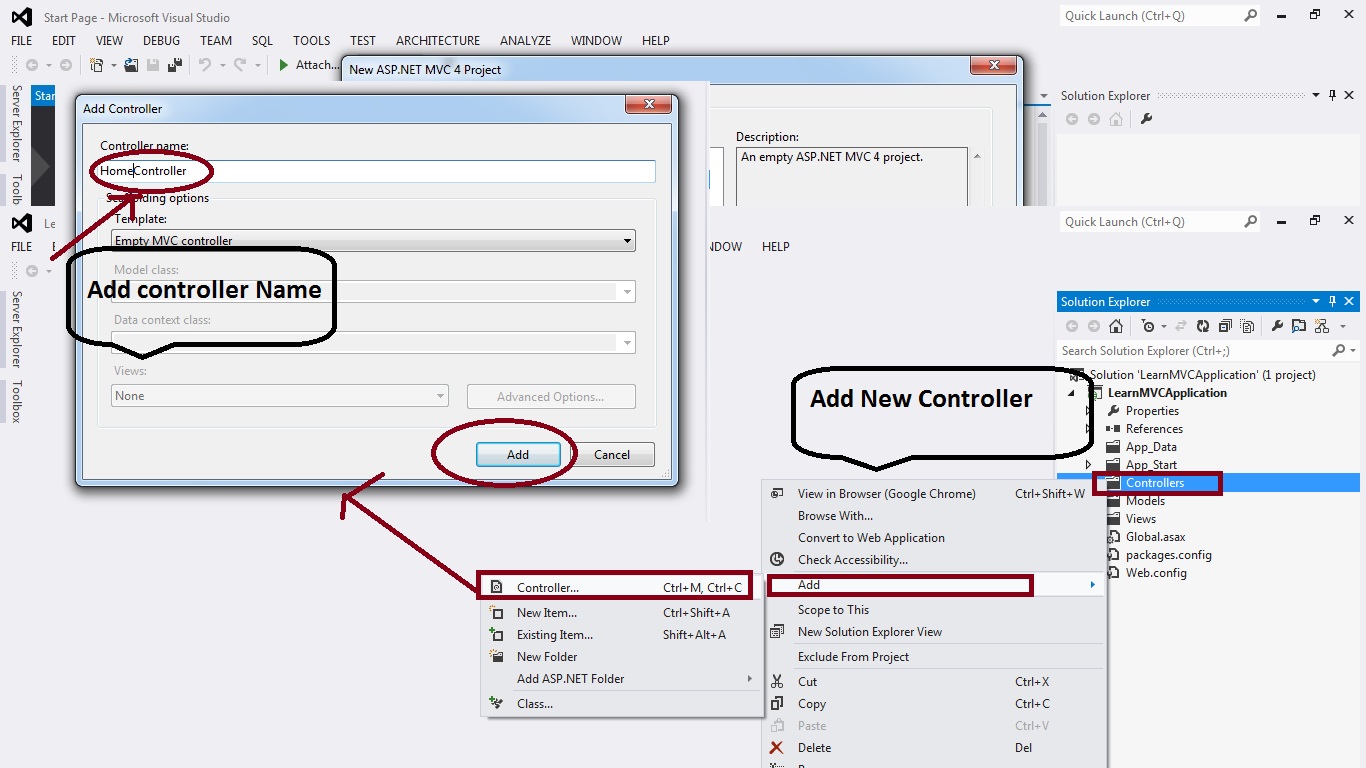
Step :3 -- Add Controller & Rename Controller
----------------------------------------------------------------


Step :4-- Add View and Unchecked the master layout
------------------------------------------------------------------------------


Step:5--- Add Content As per requirement / Design into view page
-------------------------------------------------------------------------------------


Step:6 -- Add Route action name as "....." View Page name
-------------------------------------------------------------------------------


Step:7 -- Change Controller function same name as view name
---------------------------------------------------------------------------------


Step:8 -- Run the Application & Enjoy MVC Application
------------------------------------------------------------------------------


Enjoy With Example.... Show the Images Step By Step.......

Factorial of a Number

Recently Viewed