Saturday, 22 April 2017

LogIn Page Design Using HTML,CSS & JavaScript.


Log In Template


Use Visual Studio To Run this Code.


Step ##-Follow the Below Code.

Page-1 :-LogIn.aspx
Page-2 :-LogIn.aspx.cs
Page-3 :-LogIn.CSS
Page-4 :-LogIn.Js

Note :- Connection String Defined in Web.Config
e.g:-
 <connectionStrings>
    <add name="dbconnection" connectionString="Data Source=VIJAY_CS-PC;Integrated Security=true;Initial Catalog=LogInDB" providerName="System.Data.SqlClient"/>
  </connectionStrings >
-------------------------------------------------------------------------------------------------------
Page-LogIn.aspx

-----------------------

<%@ Page Language="C#" AutoEventWireup="true" CodeBehind="login.aspx.cs" Inherits="LogInTest.test" %>

<!DOCTYPE html PUBLIC>
<html>
<head>
    <meta charset="utf-8">
    <title>DotNet By Vickypedia </title>
    <link href="LogInCSS.css" rel="stylesheet" />
    <script src="LogIn.js"></script>
    <script>
        function fnInvalidUser() {
            fnalertError("Please enter valid UserId and Password.");
            alert("Please enter valid UserId and Password.");
            return false;
        }

        function fnException(e) {
            fnalertError(e);
            alert(e);
            return false;
        }
    </script>
</head>
<body>
    <div class="container">
        <header style="border-bottom: 2px solid gray;">
            <div class="UIlogo">
                <div class="ui-logoImgDiv">
                    <a href="login.aspx">
                        <img alt="DotNet By Vickypedia" src="Images/logowithName.jpg" style="height: 60px;" data-sticky-top="15"
                            data-sticky-height="70" data-sticky-width="70">
                    </a>

                </div>
                <div class="LogInNames">
                    <asp:Label ID="lblExpMsg" runat="server" CssClass="uiError"></asp:Label>
                </div>
            </div>
        </header>
        <article style="background-color: rgba(173, 182, 187, 0.80); border-bottom: 2px solid gray;" class="login-sec">
            <table class="w-100 ">
                <tr style="height: 100px;">
                    <td>&nbsp</td>
                </tr>
                <tr>
                    <td align="right">
                        <div id="uilogInModal" class="ui-login">
                            <form id="Form1" name="form1" runat="server" class="" defaultfocus="txtPass" target="_self">
                              

                                <div id="contentDiv">
                                    <table class="w-100 hmslogInTbl">
                                        <tr><td colspan="2"> <div id="uiAlert" class="uiAlertClass"></div></td></tr>
                                        <tr>
                                            <td class="col-right">
                                                <label class="uilabel" title="Enter Your Username">User Name</label></td>
                                            <td>&nbsp&nbsp
                                                <asp:TextBox ID="txtMail" name="txtUsername" runat="server" placeholder="User Name" CssClass="uitextbox requred" MaxLength="45" autofocus=""></asp:TextBox>
                                            </td>
                                        </tr>
                                        <tr>
                                            <td class="col-right">
                                                <label class="uilabel" title="Enter Your Password">Password</label></td>
                                            <td>&nbsp&nbsp
                                                <asp:TextBox ID="txtPass" runat="server" name="txtPassword" TextMode="Password"  MaxLength="100" CssClass="uitextbox requred" placeholder="Password"></asp:TextBox>
                                            </td>
                                        </tr>
                                        <tr>
                                            <td>&nbsp&nbsp</td>
                                            <td>&nbsp&nbsp <input type="checkbox" id="chkRememberMe" />
                                            <label for="chkRememberMe" class="uilabelRM" title="remember userId and Password.">Remember Me</label></td>
                                        </tr>
                                        <tr>
                                            <td>&nbsp&nbsp </td>
                                             <td>
                                                <asp:Button ID="btnSave" runat="server" Text="Login" OnClick="btnSave_Click" OnClientClick="return logInValidation();" CssClass="uiButton"></asp:Button>
                                                <asp:LinkButton ID="lnkFrgtPass" CssClass="uiLinkButton" Text="Forgot Password" runat="server" OnClick="lnkFrgtPass_Click"></asp:LinkButton>
                                            </td>
                                        </tr>
                                    </table>
                                </div>
                            </form>
                        </div>
                    </td>
                </tr>
            </table>

        </article>
        <footer>
            <table class="w-100">
                <tr>
                    <td align="left"><a href="http://dotnetbyvickypedia.blogspot.in/" class="lnkBtn" target="new">Privacy Policy &nbsp;&nbsp;</a><span class="lnkBtn">|</span><a href="http://dotnetbyvickypedia.blogspot.in/"
                        target="new" class="lnkBtn">&nbsp;&nbsp;Terms of Use</a>
                    </td>
                    <td align="right" class="txtcopyright">Copyright &copy; DotNet By Vickypedia</td>
                </tr>
            </table>

        </footer>
    </div>
</body>
</html>

-----------------------------------------------------------------------------------------------

Page :- LogIn.aspx.cs
-----------------------------

using System;
using System.Collections.Generic;
using System.Linq;
using System.Web;
using System.Web.UI;
using System.Web.UI.WebControls;
using System.Data;
using MySql.Data.MySqlClient;
using System.Configuration;
using System.IO;
using System.Web.Security;

namespace LogIn
{
    public partial class test : System.Web.UI.Page
    {
        string conStr = ConfigurationManager.ConnectionStrings["ConnectionString"].ConnectionString;
        protected void Page_Load(object sender, EventArgs e)
        {
           
        }
        protected void btnSave_Click(object sender, EventArgs e)
        {

            string userId = Request.QueryString["userId"];
            MySqlConnection con = new MySqlConnection(conStr);
            con.Open();
            string qry = string.Empty;
            string UserType = "";
            string UserId = "";
            string UserName = "";
            string flag = "";
            qry = "select  USER_ID,concat(USER_SAL,'',USER_FIRSTNAME,'',USER_LASTNAME) as USER_NAME from user_info_mst where EMAIL_ID='" + txtMail.Text.Trim() + "' and USER_PASS='" + txtPass.Text.Trim() + "'";
             MySqlCommand cmd = new MySqlCommand(qry, con);
             MySqlDataReader mydr = cmd.ExecuteReader();
            while(mydr.Read())
            {
                UserId = mydr["USER_ID"].ToString();
                UserName = mydr["USER_NAME"].ToString();
            }
            con.Close(); 

            if (string.IsNullOrEmpty(UserType))
            {
                ClientScript.RegisterStartupScript(Page.GetType(), "validation", "<script language='javascript'>alert('Invalid Username and Password')</script>");
            }

            if (UserId != "")
            {
                Response.Redirect("Usersdashboard.aspx");
            }
          
        }


        protected void lnkFrgtPass_Click(object sender, EventArgs e)
        {
            Response.Redirect("RequestPassword.aspx");
        }
    }
}


----------------------------------------------------
Page :- LogIn.CSS
-------------------------------------------------


/*LogIn CSS*/
/****************************************************
Powered By :- DotNet By Vickypedia
Author :- VIJAY KUMAR

****************************************************/
body {
    margin: 0px 0px 0px 0px;
    background-color: lightgray;
}

footer {    padding: 1em;    color: white;    background-color: black;    clear: left;    text-align: center;}

nav {    float: left;    max-width: 160px;    margin: 0;    padding: 1em;}

nav ul {        list-style-type: none;        padding: 0;    }

nav ul a {            text-decoration: none;        }

article {    height: 470px; /*margin-left: 170px;*/    padding: 1em;    overflow: hidden;}

header {    background: white;    color: black;    position: relative;}

footer {    background: #aaa;    color: white;    font-size: small;}

.nav {    background: #eee;}

div.ui-Menu ul {    list-style-type: none;    margin: 0;    padding: 0;    overflow: hidden;    background-color: white;}

div.ui-Menu li {    float: left;}

div.ui-Menu li a {        display: block;        color: black;        text-align: center;        padding: 14px 16px;        text-decoration: none;    }

div.ui-Menu li a:hover {            background-color: silver;        }

.UIlogo {    width: 550px;    position: relative;    height: 70px;}

div.Name {    position: absolute;left: 64px;top: 0;background-size: auto auto; background-repeat: no-repeat; background-position: 0 0; width: 383px; height: 21px;}

.w-100 {     width: 100%;}
html {    padding: 0px;    margin: 0px;    height: auto;    width: 100%;    font-family: Verdana;}

.login-sec {  background: url(../Images/logInBanner.jpg) no-repeat;   background-size: 1365px 502px;}

ul {    list-style: none;  margin: 0 auto;   vertical-align: middle;    margin: 5px;}

.ui-heading {    font-weight: bold;    color: black;}

div.ui-logoImgDiv {    position: absolute;    float: left;}

div.ui-Menu {    position: absolute;    left: 1200px;}

.uilabelRM {font-size:10px;}


div#footerDiv {    height: 20px;    padding-left: 35px;    padding-top: 0px;}

/* ********************************************** */
.hmslogInTbl {}

input[type=text], input[type=password] {/*padding: 10px 5px;*/height:25px;margin: 0px 0;display: inline-block;border: 2px solid #ccc;box-sizing: border-box;}

.col-left {text-align:left;
}
.col-right {text-align:right;
}
/*input {margin-left: 120px !important;margin-bottom: 10px !important;}*/

.uitextbox {color: black;height: 20px;font-size: 11pt;padding-left: 5px;border-radius: 3px;}
label.uilabel {padding-top: 3px;font-size: 14px;}
.uiLinkButton {color: #009df5;line-height: 2.3rem;font-size: 10px;text-transform: uppercase;text-transform: uppercase;}

a.lnkBtn {text-decoration: none;}

a:link.lnkBtn {color: white;}

a:visited.lnkBtn, a:visited.uiLinkButton {color: white;}

a:active.lnkBtn {color: white;}

a:hover.lnkBtn {color: #eaeafb;}

a:focus.lnkBtn {color: #eaeafb;}
/* ********************************************** */

.uiButton {border-top-left-radius: 7px 4px;border-bottom-left-radius: 7px 4px;border-top-right-radius: 7px 4px;border-bottom-right-radius: 7px 4px;background-color: #f0f2f5;
font-weight: bold;padding: 3px 15px;text-align: center;text-decoration: none;display: inline-block;font-size: 15px;margin: 5px 10px;cursor: pointer;}

.uiButton:hover {border: 2px solid;color: white;background-color: #0089ff;}

.uiButton:active {background-color: #4F81BD;border: 2px solid;color: white;}

.uiButton:visited {background-color: red;color: white;}

.main {margin-top: 100px;}

.imgbody {float: left;width: 900px;}

.lnkBtn {line-height: 2.3rem;background: 0;color: #009df5;font-size: 10px;transition: background-color .5s ease;text-transform: uppercase;}

.cancelbtn {width: auto;padding: 10px 18px;background-color: #f44336;}

img.avatar {width: 40%;border-radius: 50%;}

.container {padding: 1px;}

span.psw {float: right;padding-top: 16px;}

/* The Modal (background) */
.modal {display: none; /* Hidden by default */position: fixed;z-index: 0;left: 815px;top: 221px;width: 35%;height: 35%;overflow: auto;padding-top: 5px;}
/* Modal Content/Box */
.modal-content {background-color: #fefefe;margin: 5% auto 0% auto;width: 100%;}

/* The Close Button (x) */
.close {position: absolute;right: 25px;top: 0;color: #000;font-size: 25px;font-weight: bold;}

.close:hover, .close:focus {
color: red;
cursor: pointer;
}

/* Add Zoom Animation */
.animate {
-webkit-animation: animatezoom 0.6s;
animation: animatezoom 0.6s;
}

@-webkit-keyframes animatezoom {
from {
-webkit-transform: scale(0);
}

to {
-webkit-transform: scale(1);
}
}

@keyframes animatezoom {
from {
transform: scale(0);
}

to {
transform: scale(1);
}
}

/* Change styles for span and cancel button on extra small screens */
@media screen and (max-width: 300px) {span.psw {display: block;float: none;}.cancelbtn {width: 100%;}}


footer {text-align: left;}

.uiError {color: red;}

.ui-login { flex-item-align:center;    background-color: white;    border: 5px solid #0089ff;    height: 165px;    width: 380px;    padding: 1em;    -moz-border-radius: 20px;    -webkit-border-radius: 20px;    -opera-border-radius: 20px;    -khtml-border-radius: 20px;    border-radius: 20px;    box-shadow: 0px 5px 20px rgba(0,0,0,0.40);    -moz-box-shadow: 0px 5px 20px rgba(0,0,0,0.40);    -webkit-box-shadow: 0px 5px 20px rgba(0,0,0,0.40);}

div.ui-logINDiv {width: 470px;height: 225px;margin-left: 855px;}

div.uiAlertClass {height: auto;text-align: center;margin-top: 0px;margin-left: 10px;margin-right: 10px;}

div.uiAlertError {height: 15px;border: 1px red solid;vertical-align: middle;margin-top: 5px;margin-left: 10px;margin-right: 10px;font-family: Verdana;font-size: 8pt;font-weight: bold;color: red;background-color: #F5F5F5;padding: 4px;-moz-border-radius: 5px;-webkit-border-radius: 5px;-opera-border-radius: 5px;-khtml-border-radius: 5px;border-radius: 5px;text-align:center;}

div.uiAlertSuccess {height: 15px;border: 1px green solid;vertical-align: middle;margin-top: 5px;margin-left: 10px;margin-right: 10px;font-family: Verdana;font-size: 8pt;font-weight: bold;color: green;text-align:center;background-color: #F5F5F5;padding: 4px;-moz-border-radius: 5px;-webkit-border-radius: 5px;-opera-border-radius: 5px;-khtml-border-radius: 5px;border-radius: 5px;}

.txtcopyright {font-size:15px;color:white;}


----------------------------------------------------------
Page :- LogIn.js

-------------------------------------------------------------


var myInterval ;

function logInValidation() {

    var returnPage = true;
    var logInForm = document.getElementById('Form1');
    var alertContent = "";
    var UserMail = logInForm.txtMail.value;
    var Password = logInForm.txtPass.value;


    if (returnPage == true) {
        if (UserMail == "") {
            fnalertError("Please enter valid UserId.");
            logInForm.txtMail.focus();
            return returnPage = false;
        }
    }

    if (returnPage == true) {
        if (UserMail != "") {
            var reg = /^([A-Za-z0-9_\-\.])+\@([A-Za-z0-9_\-\.])+\.([A-Za-z]{2,4})$/;
            if (reg.test(UserMail) == false) {
                fnalertError("You have entered an invalid email address!");
                logInForm.txtMail.focus();
                return returnPage = false;
            }
        }
    }

    if (returnPage == true) {
        if (Password == "") {
            fnalertError("Please enter valid Password. Password is case sensitive.");
            logInForm.txtPass.focus();
            return returnPage = false;
        }
    }


    if (returnPage == true) {
        fnAlertSuccess("Please wait...!!");
        return returnPage = true;
    }
    return returnPage;
}

function fnRemoveAlert() {
    var myAlert = document.getElementById("uiAlert");
    myAlert.className = "uiAlertClass";
    myAlert.innerHTML = "";
    clearTimeout(myInterval );
}


function fnalertError(alertContent) {
    var myAlert = document.getElementById("uiAlert");
    myAlert.innerHTML = alertContent;
    myAlert.className = "uiAlertError";
    myInterval  = setTimeout("fnRemoveAlert();", 10000);
}

function fnAlertSuccess(alertContent) {
    var myAlert = document.getElementById("uiAlert");
    myAlert.innerHTML = alertContent;
    myAlert.className = "uiAlertSuccess";
    myInterval  = setTimeout("fnRemoveAlert();", 10000);
}


function fnInvalidUser() {
    fnalertError("Please enter valid Username and Password.");
    return false;
}
-----------------------------------------------------------------------


Wednesday, 5 April 2017

Print Number 12345

Print Number 12345 

#1 :-USING The Console Application in Visual Studio.

#2:- Add-This Class
------------------------------------------------------------------------------------------------------------------
using System;
using System.Collections.Generic;
using System.Linq;
using System.Text;

namespace PrintNumber12345
{
    /// <summary>
    /// This is Used for print number like in below
    /// 1
    /// 12
    /// 123
    /// 1234
    /// 12345
    /// 1234
    /// 123
    /// 12
    /// 1
    /// Powered By :- DOTNET BY VICKYPEDIA
    /// </summary>
    class Program
    {
        static void Main(string[] args)
        {
            Console.Write("Powered By :- DOTNET BY VICKYPEDIA");
            Console.Write("\n");
            int number = 5;
           
            //Loop For PRINT Like
            //This Loop Start with i=1 and end with 5
            //-1
            //-12
            //-123
            //-1234
            //-12345
            for (int i = 1; i <= number; ++i)
            {
                for (int x = 1; x <= i; ++x)
                {
                    Console.Write(x);
                }
                Console.Write("\n");
            }

            //Loop For PRINT Like
            //This Loop Start with i=4 and end with 1
            //-1234
            //-123
            //-12
            //-1
            for (int i = number - 1; i >= 1; --i)
            {
                for (int x = 1; x <= i; ++x)
                {
                    Console.Write(x);
                }
                Console.Write("\n");
            }

            Console.Write("\n Thanks You");
            Console.ReadLine();

        }
    }
}
-------------------------------------------------------------------------------------------------


Saturday, 25 February 2017

Creating Pyramid in C#

Creating Pyramid in C#


To using Console Application......


class :-- application.cs

------------------------------------------------

using System;
using System.Collections.Generic;
using System.Linq;
using System.Text;
using System.Threading.Tasks;

namespace ConsoleApplicationfirst
{
    class Program
    {
        static void Main(string[] args)
        {
            fnpyramid obj = new fnpyramid();
            obj.createPyramid();

            Console.WriteLine("\n");

            obj.createPyramidNumber();

            Console.WriteLine("\n");
            Console.WriteLine("Example made by DOTNET BY VICKYPEDIA");
            
            Console.Read();
        }
    }
}


class :-- fnPyramid.cs

------------------------------------------------

using System;
using System.Collections.Generic;
using System.Linq;
using System.Text;
using System.Threading.Tasks;

namespace ConsoleApplicationfirst
{
    class fnpyramid
    {
        /// <summary>
        /// Create function for print pyramid like....
        ///     1
        ///    121
        ///   12321
        ///  1234321
        /// 123454321
        /// </summary>
        public void createPyramid()
        {
            int numberoflayer = 6, Space, Number;
            Console.WriteLine("Print paramid as Number");
            for (int i = 1; i <= numberoflayer; i++)
            {
                for (Space = 1; Space <= (numberoflayer - i); Space++)
                    Console.Write(" ");
                for (Number = 1; Number <= i; Number++)
                    Console.Write('*');
                for (Number = (i - 1); Number >= 1; Number--)
                    Console.Write('*');
                Console.WriteLine();
            }
        }


        /// <summary>
        ///  Create function for print pyramid like....
        ///          *
        ///         ***
        ///        *****
        ///       *******
        ///      *********
        /// </summary>
        public void createPyramidNumber()
        {
            int numberoflayer = 6, Space, Number;
            Console.WriteLine("Print paramid as Star");
            // Total number of layer for pramid
            for (int i = 1; i <= numberoflayer; i++) 
            {
                // Loop For Space
                for (Space = 1; Space <= (numberoflayer - i); Space++)  
                    Console.Write(" ");
                //increase the value
                for (Number = 1; Number <= i; Number++)
                    Console.Write(Number);
                //decrease the value
                for (Number = (i - 1); Number >= 1; Number--) 
                    Console.Write(Number);
                Console.WriteLine();
            }
        }

    }
}


OUTPUT
--------------------------------


Wednesday, 1 February 2017

Hello World Program with MVC

Hello World Program with MVC


Step :-1 --- Select Web Project - ASP MVC Application
----------------------------------------------------------------------------------


Step:-2 -- Select Project Template and View Engine ( ASPX)
--------------------------------------------------------------------------------


Step :3 -- Add Controller & Rename Controller
----------------------------------------------------------------


Step :4-- Add View and Unchecked the master layout
------------------------------------------------------------------------------
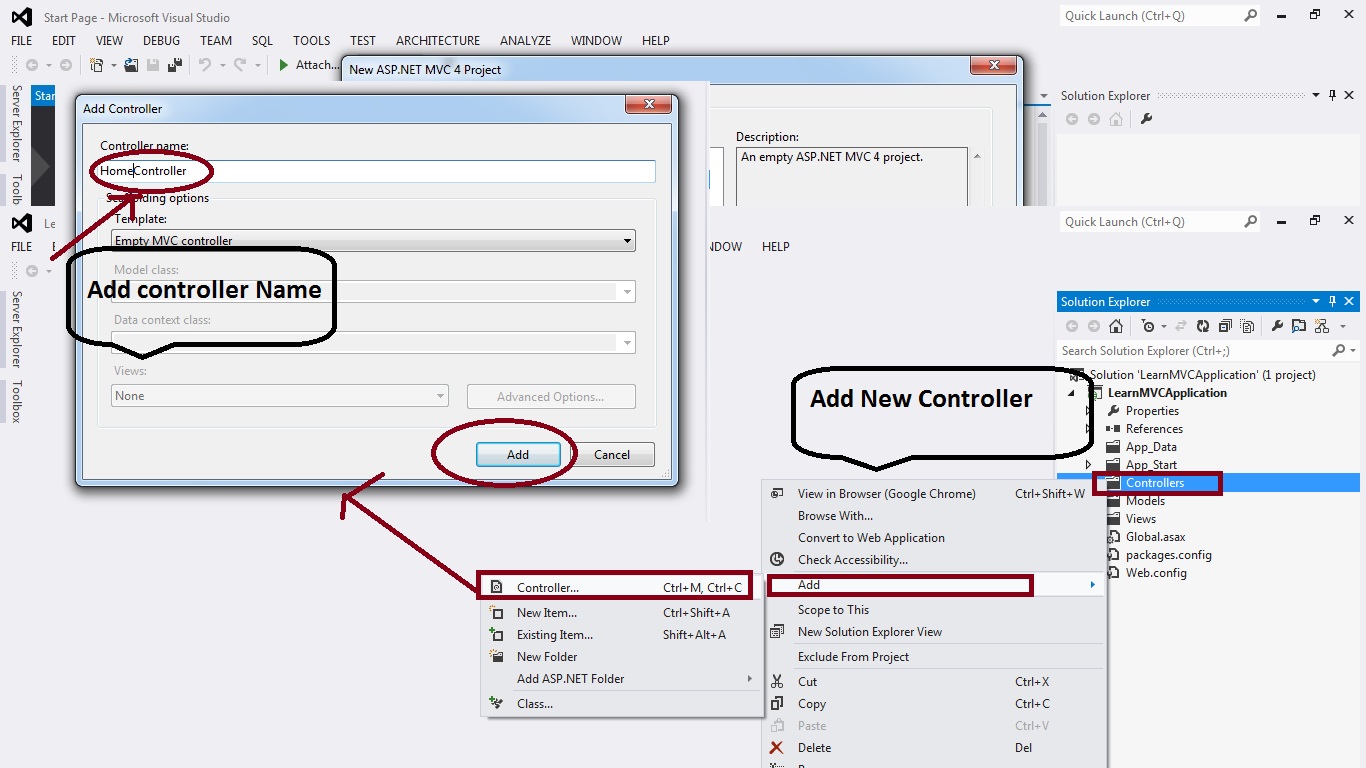


Step:5--- Add Content As per requirement / Design into view page
-------------------------------------------------------------------------------------


Step:6 -- Add Route action name as "....." View Page name
-------------------------------------------------------------------------------


Step:7 -- Change Controller function same name as view name
---------------------------------------------------------------------------------


Step:8 -- Run the Application & Enjoy MVC Application
------------------------------------------------------------------------------


Enjoy With Example.... Show the Images Step By Step.......

Tuesday, 25 October 2016

HOW TO VALIDATE INPUT FIELD NUMERIC WITH FIXED NUMBER.

HOW TO VALIDATE INPUT FIELD NUMERIC WITH FIXED NUMBER OF DIGIT


Validation for Number(CONTACT NUMBER (10 Digit max )).

--------------------------------------------------------------------------------------------------------------------------
<script language="javascript" type="text/javascript">

    function fixedlength(textboxID, keyEvent, maxlength) {
        //validation for digits upto 'maxlength' defined by caller function
        if (textboxID.value.length > maxlength) {
            textboxID.value = textboxID.value.substr(0, maxlength);
        }
        else if (textboxID.value.length < maxlength || textboxID.value.length == maxlength) {
            textboxID.value = textboxID.value.replace(/[^\d]+/g, '');
            return true;
        }
        else
            return false;
    }

    function CheckMax(controlname) {
        var num = document.getElementById('<%=txtAmount.ClientID %>').value;
        if (num > 100 || num <= 0) {
            alert('Please Enter Value between 1 to 100');
            document.getElementById('<%=txtAmount.ClientID %>').value = '';
               document.getElementById('<%=txtAmount.ClientID %>').focus();
            return false;
        }
     return true;
 }
</script>
--------------------------------------------------------------------------------------------------------------------------
--------------------------------------------------------------------------------------------------------------------------

<form id="form1" runat="server" action="ValidateFormWebUI.aspx" autocomplete="off">
        
            
            <div class="submain">
                <table class="tblform">
                    <tbody>
                          <tr>
                            <td class="textfield" title="Enter Name">Name</td>
                            <td class="textfield">
                                <input id="txtName" name="NAME" class="InputField" maxlength="150" type="text" value="" /></td>
                        </tr>
                        <tr>
                            <td class="textfield" title="Enter Name">Contact</td>
                            <td class="textfield"><asp:textbox class="InputField" id="txtContactNo" runat="server" maxlength="10" onblur="return fixedlength(this, event, 10);" onkeypress="return fixedlength(this, event, 10);" onkeyup="return fixedlength(this, event, 10);"></asp:textbox></td>
                        </tr>
                         <tr>
                            <td class="textfield" title="Enter Name">Amount (0-100)</td>
                            <td class="textfield"><asp:textbox class="InputField" id="txtAmount" runat="server" maxlength="3"></asp:textbox></td>
                        </tr>
                    </tbody>
                </table>
            </div>
       
    </form>

Monday, 5 September 2016

SQL JOINS with Examples

SQL JOINS with Examples


SQL JOIN :- The SQL Joins clause is used to combine records from two or more tables in a database. A JOIN is a means for combining fields from two tables by using values common to each.

INNER JOIN:- An SQL INNER JOIN returns all rows from multiple tables where the join condition is met.

NOTE :- IN Example Using Table find in below link page.


Example:- 

SELECT Emp1.ID,Emp1.Name,User1.ID,User1.City
FROM Emp1
INNER JOIN User1
ON Emp1.ID=User1.ID;


LEFT JOIN :- The SQL LEFT JOIN returns all rows from the left table, even if there are no matches in the right table.

EXAMPLE :- 

SELECT Emp1.ID,Emp1.Name,Emp1.Company,User1.ID,User1.Name,User1.City
FROM Emp1
LEFT JOIN User1
ON Emp1.ID=User1.ID;


RIGHT JOIN:- The SQL RIGHT JOIN returns all rows from the right table, even if there are no matches in the left table. 

EXAMPLE :- 

SELECT Emp1.ID,Emp1.Name,Emp1.Company,User1.ID,User1.Name,User1.City
FROM Emp1
RIGHT JOIN User1
ON Emp1.ID=User1.ID;


Factorial of a Number

Recently Viewed